
Once you've been invited to access the Citylitics Intelligence Platform, you will receive an email with instructions on how to create your account. If you are expecting to access the Citylitics Intelligence Platform and have not received an invitation via email, please contact your Customer Success Manager or reach out to help@citylitics.com.
Follow the steps below to create an account to access your Citylitics Intelligence Platform:
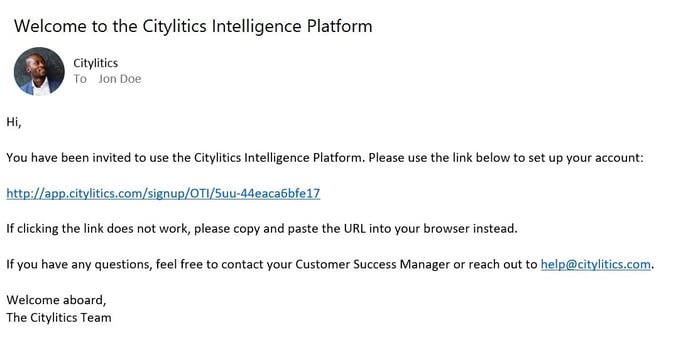
1. You will receive an email with the subject line “Welcome to the Citylitics Intelligence Platform" as shown below. Open the email and click the account creation link. You will be redirected to an account creation webpage. If you are not redirected, copy the URL and paste it in a web browser address bar.
*Note that the account creation link is a one-time use link, and will expire in 7 days.
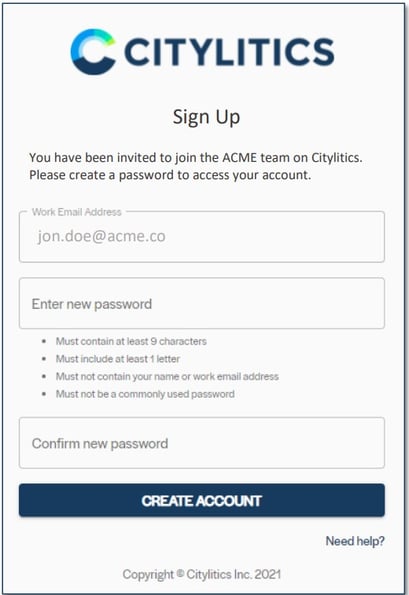
2. You will be redirected to the account creation page as seen below. Your account will be registered to the email address you provided to Citylitics. You will be prompted to create a password to your account. The password must meet the following requirements:
• Must contain at least 9 characters
• Must include at least 1 letter
• Must not contain your name or email address
• Must not be a commonly used password
Re-type the password in the Confirm new password field, then select CREATE
ACCOUNT
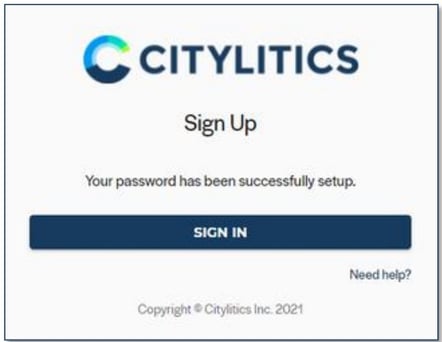
3. After creating your password, you will be prompted to sign in. Select SIGN IN and enter your email address and password.
4. Once your account is created, go to https://app.citylitics.com to access your Citylitics
Intelligence Platform.