
Research Explorer (REX) is an AI research assistant tool integrated directly into the Citylitics platform. REX is designed to accelerate deeper analysis and cut the prep time required for project qualification and key decision-making. By generating detailed project report and account intelligence from trusted public sources, REX provides the data needed to qualify infrastructure opportunities quickly and confidently.
What is Research Explorer (REX)?
REX acts as a specialized lens for public infrastructure data. Unlike open-source AI tools, it focuses exclusively on the context of your specific opportunity.
- Contextual Awareness: REX understands the specific opportunity you are investigating and filters all findings to remain relevant to that goal, even if you navigate to another.
- Grounded in Official Sources: The tool's logic prioritizes official municipal, authority, and government portals; the primary sources used by procurement and engineering teams.
- Citable Intelligence: Every fact REX surfaces is tied to a specific source URL or document, such as a city council agenda, website or a Capital Improvement Plan (CIP), maintaining a clear chain of custody for your data.
- Unified Intelligence View: By surfacing the most relevant information at the exact moment you need it, REX eliminates the need to toggle between different documents and web pages, providing a complete picture in a single view.
- Non-Blocking Workflow: REX runs its research in the background, so you can keep working the record while a report generates instead of waiting on it.
How to Use REX: A Step-by-Step Walkthrough
Research Explorer is accessible from any Insight or Opportunity view within Citylitics.
Step 1: Launch REX
- Navigate to an Opportunity (e.g., "Weston Municipal Utility District (MUD), TX - Pipe Initiatives").
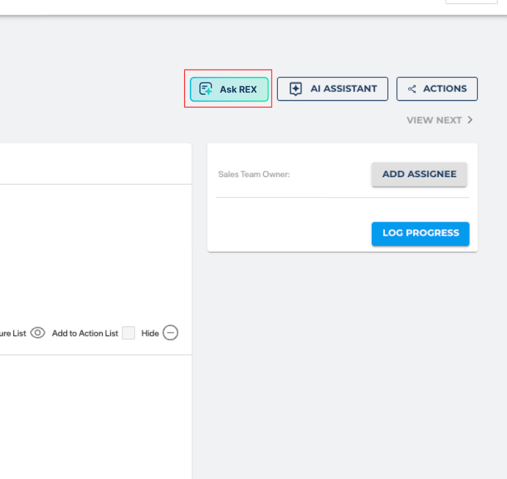
- Click the Research Explorer button located in the top action bar to open the research interface.
Step 2: Choose Your View — Side Panel or Full View
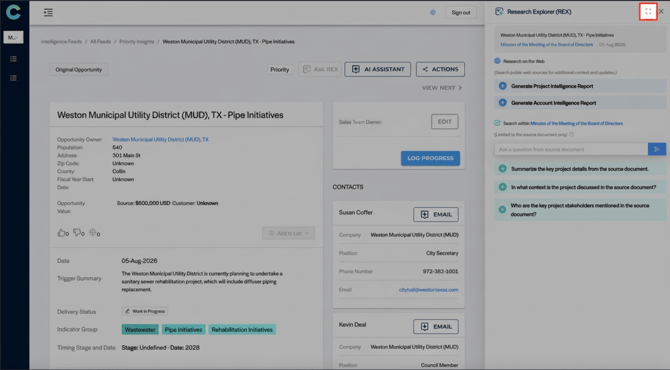
REX opens docked to the side panel by default, so you can reference the underlying Opportunity or Insight record while REX works. You can switch how it displays at any time depending on how you want to work:
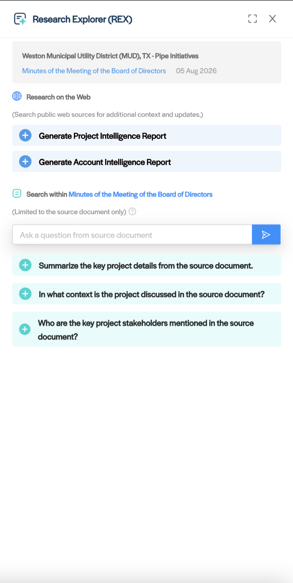
- Side Panel (Dock): The default view. REX stays pinned to the right-hand side of your screen alongside the record, so you never need to close the tool and reopen it to double-check a detail.
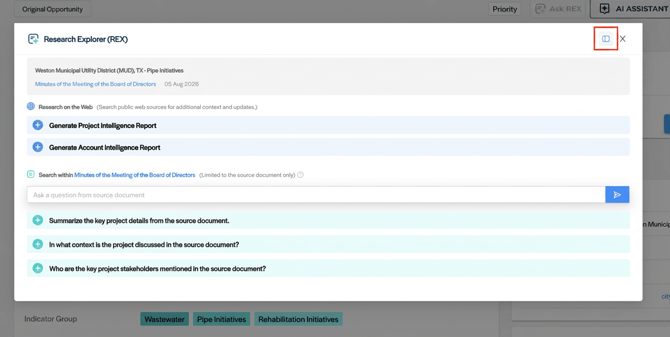
- Full View: Click the expand icon to open REX in the larger, centered modal view, useful when you want to focus fully on reviewing a generated report.
You can switch between these two views at any point in your session; your active research and any in-progress reports carry over automatically. Whichever view you switch to will be remembered as your default for the rest of that session, but resets back to the side panel default the next time you sign in.
Step 3: Run a Research Prompt
REX offers two ways to generate a report, depending on what you need:
- Research on the Web: Click a prompt to search public sources for additional context and updates:
- Generate Project Intelligence Report: Performs a rigorous fact-check across official records to produce a source-verified summary of essential scope, budget, timeline, and status details for the project.
- Generate Account Intelligence Report: Builds a strategic profile of the municipality's spending history and existing relationships to help you qualify the account against your firm's acceptance criteria.
- Search Within the Source Document: When an Opportunity or Insight is tied to a specific source document (e.g., a meeting agenda or Minutes of the Meeting of the Board of Directors), REX gives you a set of suggested questions limited to that document only, plus a free-text box to ask your own:
- Summarize the key project details from the source document.
- In what context is the project discussed in the source document?
- Who are the key project stakeholders mentioned in the source document?
Step 4a: Keep Working While REX Runs
Report generation happens in the background, so you don't have to sit and wait on it:
- Once you click a prompt, REX begins pulling and synthesizing sources asynchronously.
- With REX docked to the side panel, you're free to keep reviewing the Opportunity, jump to another Insight, or continue your workflow. REX will notify you in the panel once the report is ready.
- If you navigate away entirely and come back, your generated report will still be there waiting for you under that Opportunity's REX history.
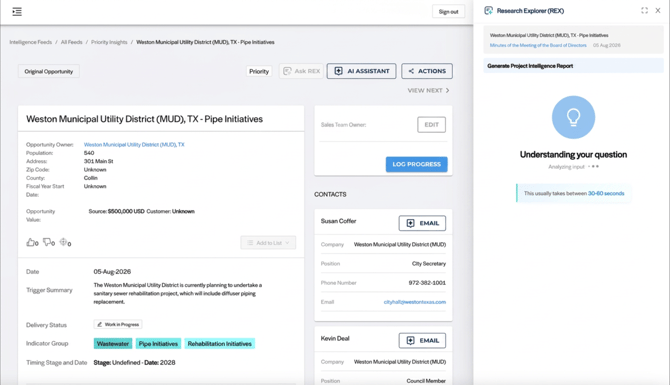
Step 4b: Switching Context Between Opportunities
Because REX ties its research to the specific record you launched it from, working across multiple Opportunities in the same session requires a quick check to make sure REX is looking at the right one:
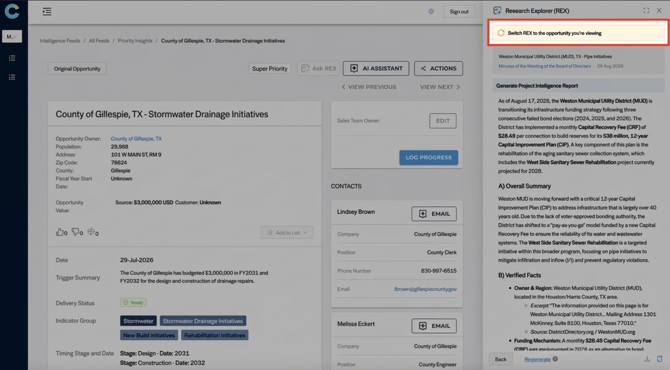
- Context Warning Bar: If you navigate to a different Opportunity or Insight while REX is still open (especially when docked to the side panel), a warning bar reading "Switch REX to the opportunity you're viewing" will appear at the top of the REX panel. This means REX's current research is still associated with the previous record, not the one you're now looking at.
- Quick-Switch Action: Click the warning bar to instantly align REX with the record you're currently viewing, in one click, no need to relaunch REX from scratch.
This makes it easy to work through multiple Opportunities back-to-back while keeping REX docked, without accidentally generating or reading a report against the wrong record.
Step 4c: Navigating to a Dashboard or Feed
Just like switching between two Opportunities or Insights, navigating away to a Dashboard or a Feed view will maintain the context of the original opportunity from where REX was triggered.
- REX will not display a "switch context" prompt in this case, since there's no specific opportunity to switch to.
Step 5: Review, Save and Export
- Review: REX outputs are a strong starting point. While REX provides a structured summary and verified facts, your team's expertise and judgment remain essential, especially for formal pursuit decisions.
- Regenerate & Refine: Research and web data are dynamic. If a specific report doesn't capture the exact angle you're looking for, click the Refresh button. This prompts REX to re-examine the available data and provide a fresh perspective or more detailed summary to ensure you have the best possible starting point.
- Export: Copy the text to your clipboard or download the report as a PDF to share with your team.
- Save Button: After REX generates a response, a new Save button appears in the bottom-right corner alongside Regenerate, Download PDF, and Copy.
%20(1).png?width=311&height=591&name=Screenshot%202026-09-09%20at%2010.47.15%20AM%20(2)%20(1).png)
Step 6: Viewing a Saved Response in the Opportunity
In addition to copying or exporting a report, you can now save REX responses directly to an Opportunity so your whole team can reference them later:
- Return to Home: Clicking Save takes you back to the REX "Home" view for that Opportunity, where you can submit a new prompt or browse previously saved responses.
- Team Visibility: Saved responses are visible to every user assigned to the same team, so research doesn't have to be redone or re-shared manually.
%20(1).png?width=334&height=500&name=Screenshot%202026-09-09%20at%2010.47.39%20AM%20(1)%20(1).png)
Detailed Breakdown: Questions & Prompts
|
Strategic Objective |
Primary Question |
Output Goal / Use Case |
|
Pursuit Decision (Web Search) |
Generate Project Intelligence Report |
Validation: Provides a source-verified summary of scope, budget, and timeline to help you decide whether to commit proposal resources. |
|
Project Background (Web Search) |
Generate Project Intelligence Report |
Context: Reconstructs the project's history: prior phases, past procurement activity, and linked documents, so you understand how the project evolved. |
|
Account Qualification (Web Search) |
Generate Account Intelligence Report |
Firm Fit: Profiles the municipality's spending history and engineering relationships to see if they meet your acceptance criteria. |
|
Document Summary (Source Document) |
Summarize the key project details from the source document. |
Quick Read: Condenses the source document (e.g., meeting minutes or agenda) into the key project facts without needing to read the full document yourself. |
|
Situational Context (Source Document) |
In what context is the project discussed in the source document? |
Nuance: Surfaces why and how the project came up in the document, such as whether it was a vote, a discussion item, or a budget line. |
|
Stakeholder ID (Source Document) |
Who are the key project stakeholders mentioned in the source document? |
Relationship Mapping: Identifies the people and roles tied to the project directly from the source document, to help with outreach planning. |
Frequently Asked Questions (FAQ)
How current is the information surfaced by REX? Web research reflects what is publicly available at the exact time you request it.
What if REX can't find an answer? REX is designed to acknowledge uncertainty. If reliable information is not found in the official records, it will list the item as "Not Confirmed" or "Unknown" rather than generating a guess.
Why are some of the source links "noisy" or hard to map? In some cases, you may find sources that contain broad information or links that require manual navigation. We are actively working on a more precise 1:1 citation matching system for our next iteration to reduce this "noise" and make source mapping more seamless.
Where do the "Verified Facts" come from? These are grounded in the actual documents REX scans, such as Tentative Capital Budgets or City Council Meeting Minutes. REX provides the direct URL so you can verify the original source yourself.
Can I save these reports to my CRM? Currently, you can copy output to your clipboard or export to PDF. Direct CRM integration is a planned feature for a future release.
Can I work on other things while REX generates a report? Yes. REX runs asynchronously in the background, so you can dock it to the side panel and continue working the Opportunity or Insight, switch to another record, and come back once the report is ready.
Who can see my research activity? Your REX output and search history are visible only to users within your firm's Citylitics account. Your data is not used to train AI models shared with other customers.
What happens if I forget to switch REX to the Opportunity I'm viewing? REX will keep showing research for the previous record and the context warning bar will remain visible until you click it to switch. No report will be misattributed silently; the warning stays on screen as a reminder.
Does REX remember which view (side panel or full view) I prefer? Yes, for the length of your current session. If you switch to Full View, REX will stay in Full View as you move between records until you sign out or start a new session, at which point it resets back to the side panel default.
What happens to REX when I navigate to a Dashboard or Feed? REX loses its Opportunity/Insight context since there's no single record to research against. Your saved reports aren't lost, they're just waiting for you back under that Opportunity's REX history whenever you return to it.