![citylitics-logo-white.png]](https://support.citylitics.com/hs-fs/hubfs/citylitics-logo-white.png?height=40&name=citylitics-logo-white.png)
1. If your search term is an official entity name (e.g., city, county, village, utility, or transit authority):
Searching for an Official Entity (City, County, Utility, etc.)
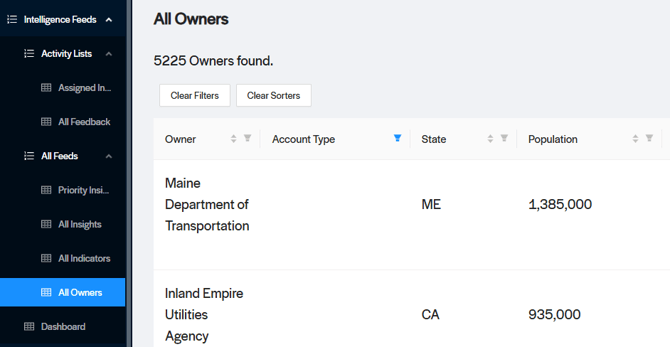
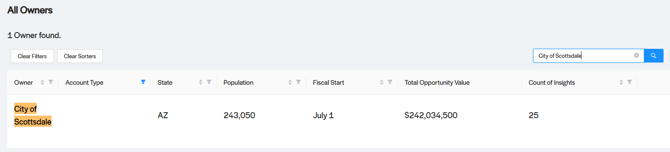
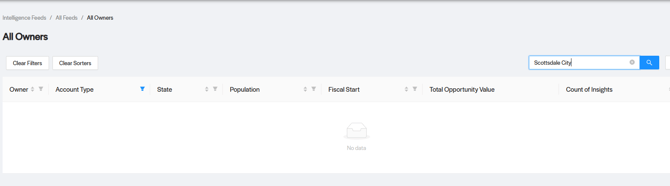
- Where to go: We recommend heading directly to the 'All Owners' tab and using the search bar there.
- Pro Tip: When searching, use the formal name format. For example, try "City of ABC" or "County of XYZ" rather than "Diamond City" or "Fletcher County."
2. Searching for Team Members or Your Own Assigned Insights:
- Where to go: Navigate to the Assigned/My Insights view using the selector at the top-left of the landing page.
- What to do: Simply click ‘view’ next to the correct name to see the relevant assigned insights.

3. Searching by State Name or State Code:
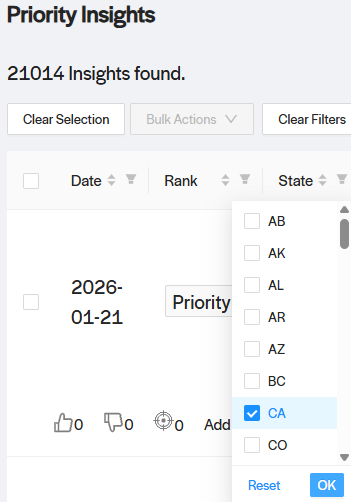
- Using Filters: In the Assigned/My Insights, Priority Insights, or All Insights views, click the Filter Icon in the state column, select your state code, and click OK.
- Using Search: You can also type the full state name directly into the search bar within these same views.
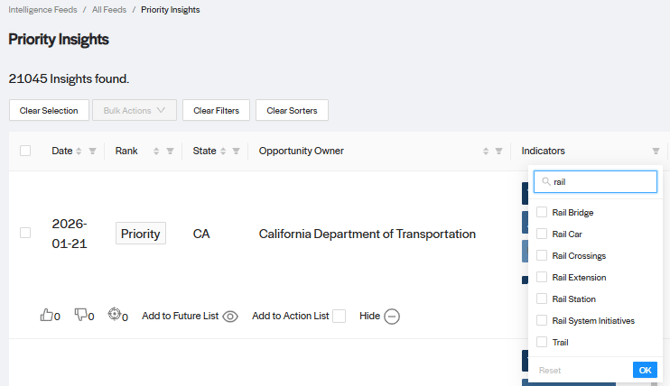
4. Searching for Industry Topics or Keywords (e.g., pipe, rail, clarifier):
- Using Filters: In the Priority Insights or All Insights tabs, use the Indicator Filter to find your term and select OK.
- Alternative: You can also go to the All Indicators tab on the left-hand side and search for your term there

5. Deep Search Option
- You can use the Deep Search feature within the Dashboard Module.
- Quick Note: Please make sure to enter your search terms in lowercase only.

6. Need Further Assistance?
- If you’ve followed these steps and still aren't seeing the results you need, please let your CSM know! We are here to help investigate any data gaps and will get back to you with an update as quickly as possible.